
Importing Packages Outside node_modules in Vite
5/8/23Less than 1 minute
Reference: http://mars3d.cn/doc.html#start/download
Steps
- Create a new folder named
packages. - Copy the package you want to replace (using
mars3das an example here) fromnode_modules/mars3d/to thepackages/mars3d/directory. - Modify the
mars3dpackage configuration inpackage.jsonto:"mars3d": "file:packages/mars3d", - Delete
node_modulesand runnpm installagain to install dependencies.
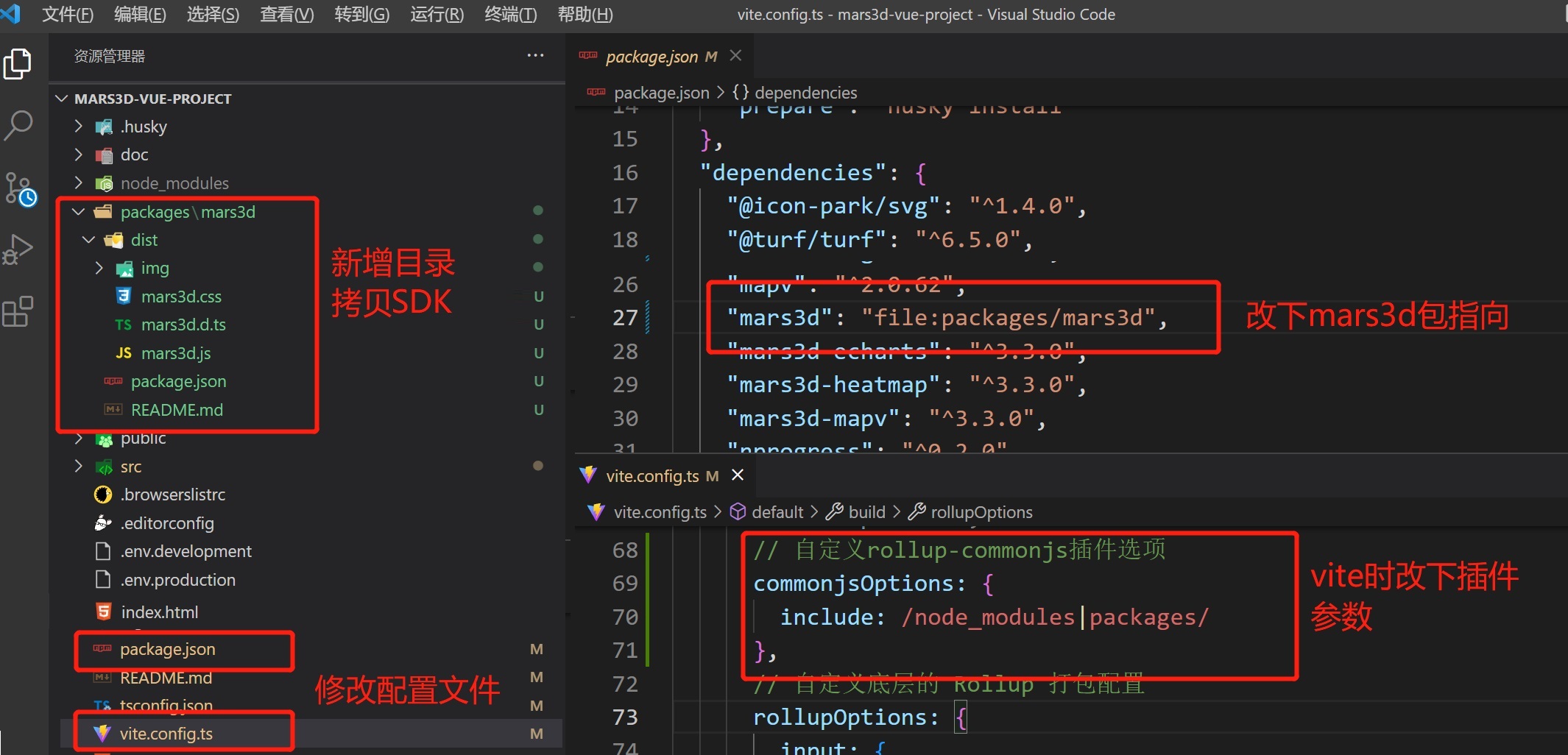
This will create a shortcut in node_modules pointing to the external folder.
Additional Notes
In Vite, you need to exclude it (if packages is already included, you can ignore this modification). If the original project has other configurations, do not delete those values.
build: {
  commonjsOptions: {
    // By default, only node_modules is processed internally, you also need to mark "packages/" for processing
    include: /node_modules|packages/
  },
  // Other configurations are ignored
}
AI Translation | AI 翻译
This article was translated from Chinese to English by AI. If there are any inaccuracies, please refer to the original Chinese version.
本文由 AI 辅助从中文翻译为英文。如遇不准确之处,请以中文原版为准。